I'm going to tell you something that most AI companies don't want you to hear: the AI model underneath your tools barely matters.
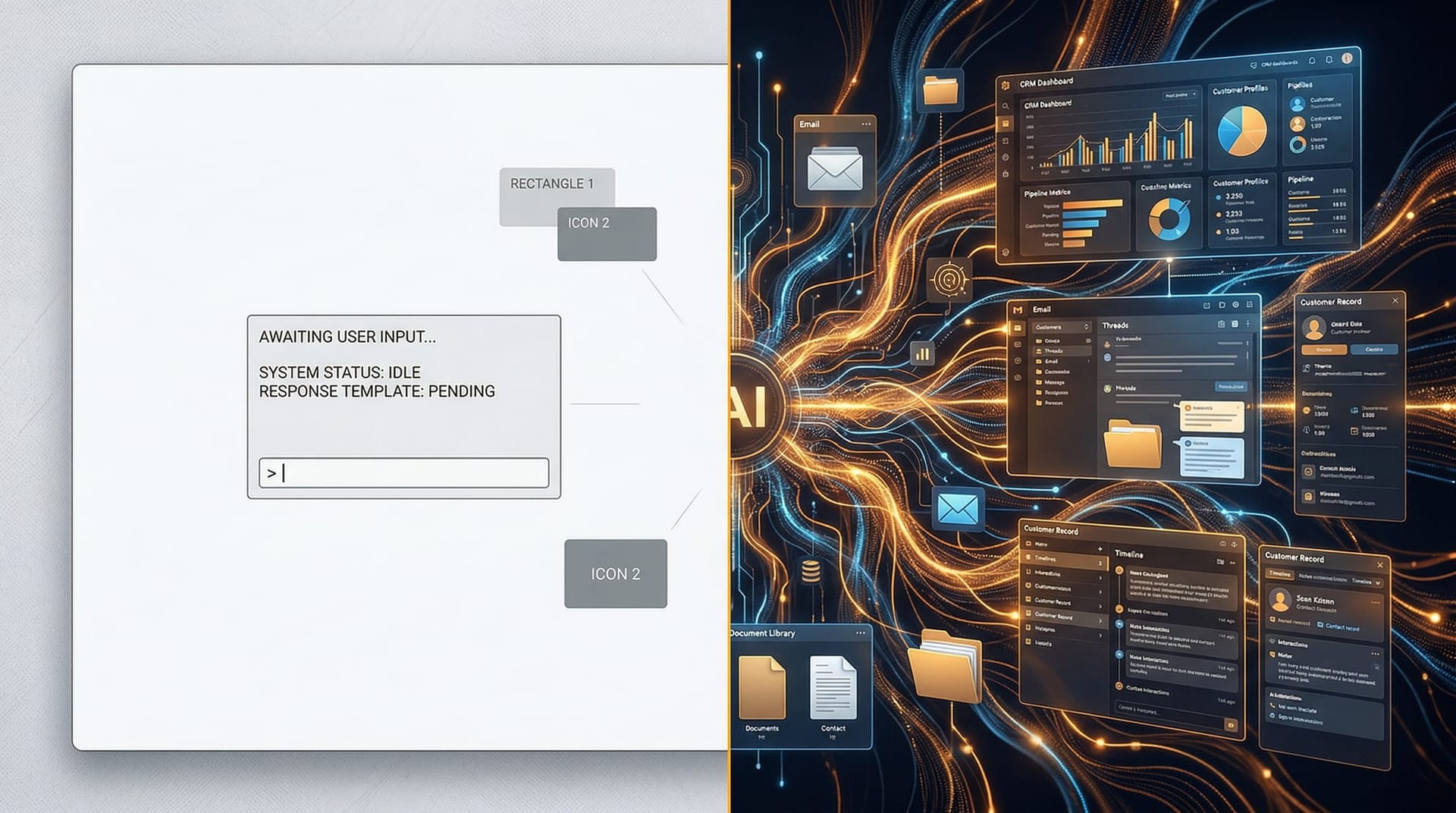
Not “doesn't matter at all.” But far, far less than the tech industry's obsession with model benchmarks and parameter counts would suggest. The thing that actually determines whether AI delivers value to your business isn't the brain — it's the body. The interface. The way AI connects to your workflows, your tools, your data, and your team.
This isn't my opinion. It's the central argument from Ethan Mollick, a Wharton professor and one of the most respected researchers studying AI adoption in businesses. In his recent piece Claude Dispatch and the Power of Interfaces, Mollick makes the case that we've built “one of the most powerful technologies in recent history and then made people access it by typing into a chat window.”
That chat window is the problem. And fixing it is what separates an AI Employee from a chatbot.
Key Takeaways
- The AI model underneath matters far less than how you interact with it — the interface determines value
- Research shows chatbot interfaces create cognitive overload that offsets productivity gains, especially for less experienced workers
- The same AI model produces dramatically different results depending on its interface and workflow integration
- AI Employees succeed because they meet workers in existing workflows — phone, email, CRM — instead of forcing everyone into a chat box
- Businesses should evaluate AI by asking “does this fit my workflow?” not “which model scores highest on benchmarks?”
- The future of AI is interfaces that adapt to you, not interfaces you adapt to

What Does “Interfaces Matter More Than Models” Actually Mean?
Mollick's argument starts with a distinction most business buyers miss entirely. In a companion piece on AI selection, he breaks the AI landscape into three layers: models (the underlying AI brain), apps (the user-facing product), and harnesses (the systems that give AI access to tools and the ability to take actions).
The critical insight: “The exact same model...asked the exact same question...in three different apps and harnesses” produces wildly different results. The model doesn't change. The interface changes everything.
Think about it this way. If you hand two employees the same phone but give one a CRM app and the other a notepad app, the one with the CRM will close more deals. The phone hardware didn't change. The interface — the tool that connects the employee to the work — made the difference.
AI works the same way. GPT-5.2, Claude Opus 4.6, and Gemini 3 Pro are all capable models. But accessing any of them through a browser chat window is like giving your best salesperson a notepad when they need a CRM. The capability is there. The interface is choking it.
This is the same distinction we've been making since day one. If you've read our breakdown of why an AI Employee isn't a chatbot, Mollick's research gives you the academic backing for what you already felt: that chat windows are the wrong interface for business work.

Why Do Chatbot Interfaces Actually Hurt Productivity?
Mollick doesn't just claim chat interfaces are bad — he cites research backing it up. In his analysis of AI interfaces, he highlights a study of financial professionals using GPT-4o that found productivity gains were offset by cognitive overload. The researchers measured “cognitive load from the transcripts, turn by turn” and found that the chatbot format actively worked against productive use.
The problem is structural. When you ask a chatbot a specific question, you get back “five paragraphs that contain the answer (somewhere!) while the AI also offers three new things you didn't ask about.” You have to parse, filter, and reorganize the response yourself. That parsing effort — what researchers call cognitive load — eats into the time you saved by using AI in the first place.
Worse, the people who need AI most benefit least from the chat format. Mollick notes that “less experienced workers, exactly the people who could benefit the most from AI” suffer most from interface-driven cognitive overload. They get lost in sprawling conversations, can't keep track of threads, and end up more confused than when they started.
There's also what Mollick calls the “compounding messiness effect.” Once a chat conversation becomes disorganized, it stays that way. The AI mirrors user disorganization. The user, already overwhelmed, doesn't reorganize. Both parties compound the chaos.
Every Fort Wayne business owner who has tried using ChatGPT for actual work has experienced this. You paste in a customer email and ask for a response. You get three paragraphs, two follow-up suggestions, and an offer to rewrite the email in a different tone. You wanted one thing. You got a buffet. The cognitive cost of sorting through that buffet is real, and it compounds across every interaction.
This is precisely why introducing an AI Employee to your team succeeds where “just give everyone ChatGPT logins” fails. The interface matters as much as the capability.
How Do Purpose-Built Interfaces Change AI Outcomes?
Mollick surveys the emerging landscape of purpose-built AI interfaces, and the pattern is clear: every interface that works well is one that meets users where they already are instead of forcing them into a chat box.
The phone interface. When a customer calls your business and an AI Employee answers, the customer doesn't know or care what model is running underneath. They care that the phone was answered on the first ring, their question was handled, and their appointment was booked. The phone is the interface. The AI model is invisible — as it should be.
We've seen this firsthand. Our phone-capable AI Employees handle 100 calls simultaneously not because the underlying model is special, but because the phone interface removes every barrier between the customer and the outcome. No chat window. No typing. No five-paragraph response to parse. Just a conversation that ends with a booked appointment or a resolved issue.
The email interface. An AI Employee that monitors your inbox, drafts responses, routes messages to the right team member, and flags urgent items doesn't require anyone to “use AI.” The email interface is invisible. Your team sees emails handled. They don't see a chat window.
The CRM interface. When an AI Employee updates contact records, logs call notes, and triggers follow-up sequences inside your existing CRM, the interface is the CRM itself. No one has to learn a new tool, open a new tab, or copy-paste between systems.
Mollick highlights Google's experimental tools as examples of this thinking. Stitch lets users describe an app in natural language. Pomelli takes a website URL and generates social media campaigns using marketing language, not AI prompts. These interfaces work because they speak the user's professional language instead of demanding prompt engineering skills.
The comparison to our approach is direct. We examined why generic AI tools fail compared to custom AI Employees — and the core reason is interface mismatch. Generic tools force business workflows into a chat paradigm. Custom AI Employees embed AI into the workflow paradigm the business already uses.
What Can We Learn From the Best AI Interfaces Available Today?
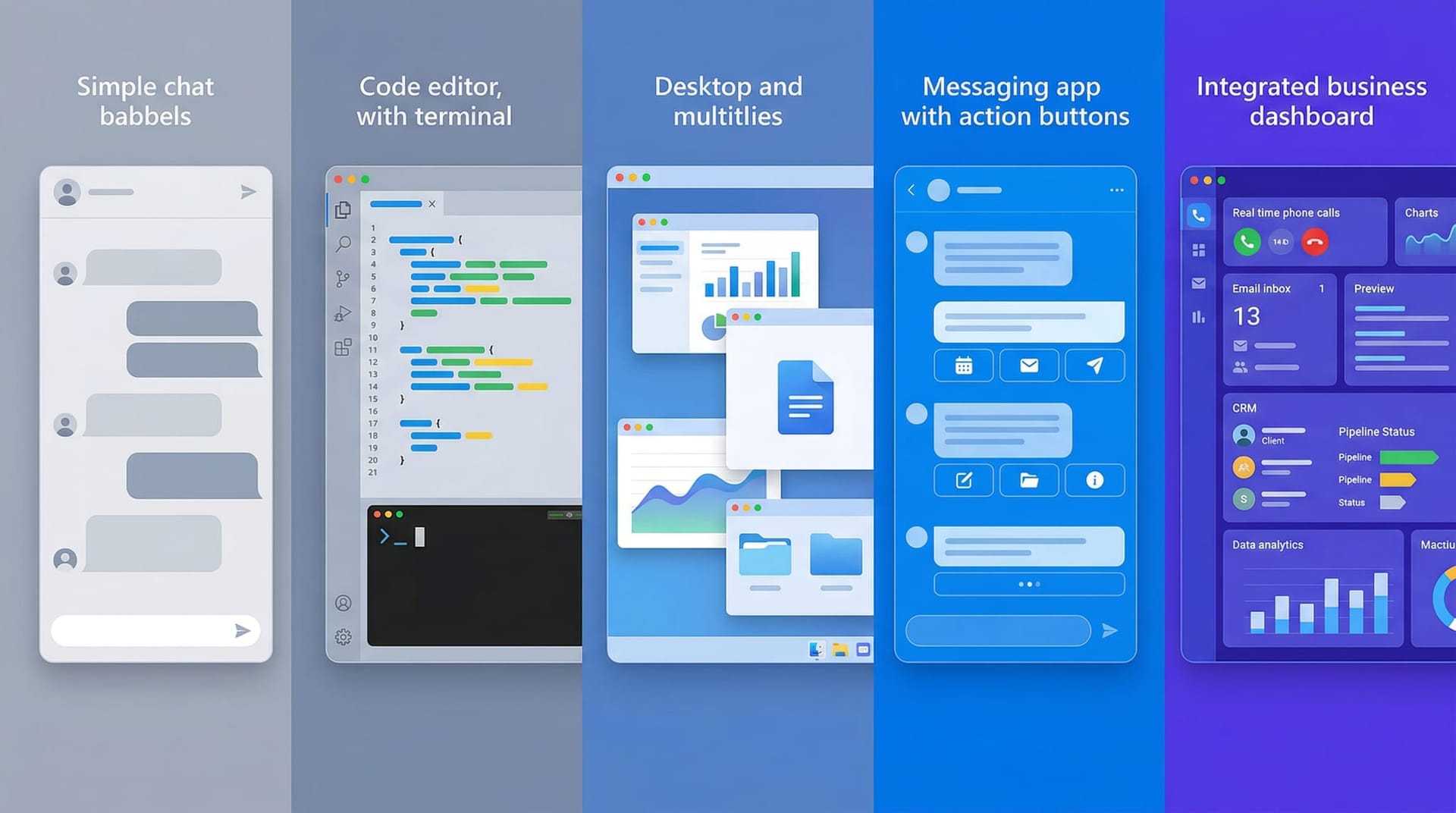
Mollick's analysis of the current AI interface landscape reveals a maturity curve that maps directly to business value:
| Interface Type | Example | Strength | Limitation |
|---|---|---|---|
| Browser chat window | ChatGPT, Claude.ai, Gemini | Accessible, general-purpose | Cognitive overload, no workflow integration |
| Coding agent | Claude Code, OpenAI Codex | Autonomous, high-value output | Built for developers, not business users |
| Desktop agent | Claude Cowork with Dispatch | Local file/app access, multi-tool | Limited connector ecosystem, error-prone |
| Personal agent | OpenClaw via WhatsApp/Slack | Familiar interface, action-oriented | Significant security concerns |
| Purpose-built business tool | AI Employee (phone, email, CRM) | Invisible interface, workflow-native | Requires upfront configuration |
The pattern: the more an interface matches the user's existing workflow, the more value it delivers. And the more it forces users into a generic interaction pattern (typing into a chat box), the more value it destroys through cognitive overhead.
Mollick's most striking example involves Claude Cowork with Dispatch — a system where he messages AI from his phone and it executes tasks on his desktop computer. He requested a morning briefing, and the system accessed his calendars, emails, and online channels to produce a report. He asked it to check a specific slide's graph in a presentation, and it opened the PowerPoint, found fresher data from research papers, downloaded PDFs, extracted updated graphs, and revised the slide.
The interface was a phone message. The complexity was invisible.
This is the principle behind every AI Employee we deploy. The business owner's interface might be a Slack message: “How many leads came in this week?” The AI Employee's work — querying the CRM, compiling the data, formatting the response — happens silently. The owner gets an answer, not a five-paragraph essay with follow-up suggestions. For more on how different AI tools stack up on this dimension, see our AI Employee vs. Copilot vs. Einstein comparison.

Why Does the “Which AI Is Best?” Question Miss the Point?
Every week, a business owner asks us: “Should we use ChatGPT or Claude or Gemini?” Mollick's research reframes that question entirely.
All three frontier models (GPT-5.2, Claude Opus 4.6, Gemini 3 Pro) are extraordinarily capable. The differences between them on most business tasks are marginal. What is not marginal is the difference between accessing any of these models through a chat window versus accessing them through a purpose-built workflow interface.
Mollick puts it bluntly: “An AI that does things is fundamentally more useful than an AI that says things, and learning to use it that way is worth your time.”
The “doing” is the interface. An AI that says your invoices are overdue (because you asked in a chat window) is less useful than an AI that flags overdue invoices in your accounting system, drafts follow-up emails, and routes escalation cases to your accounts receivable team. Same model. Different interface. Completely different business outcome.
This is why management skills are becoming the AI superpower Mollick predicted. The skill isn't prompt engineering. It's knowing what your business workflows need and directing AI capabilities into those workflows through the right interfaces. You're managing an AI Employee, not chatting with a bot.
In his guide to AI selection in the agentic era, Mollick notes that the minimum investment threshold for serious AI use is $20/month for any of the three frontier platforms. Free models are “optimized for chat rather than accuracy” — unsuitable for consequential work. But even at the paid tier, the chat interface remains the bottleneck. Paying for the best model and accessing it through the worst interface is like buying a Ferrari and driving it in first gear.

How Should Fort Wayne Businesses Think About AI Interfaces?
The interface question has a specific answer for businesses in Fort Wayne and Northeast Indiana. Your team isn't composed of prompt engineers. They're receptionists, office managers, project coordinators, sales reps, and operations leads. They use phones, email, spreadsheets, and CRM systems — not chat windows.
The right AI interface for your business is the one your team already uses every day.
If your biggest bottleneck is phone coverage: An AI Employee with a phone interface answers calls, books appointments, and routes urgent issues — using the same phone system your team already knows. No new tool to learn.
If your biggest bottleneck is lead follow-up: An AI Employee integrated with your CRM automatically follows up with new leads via email or text, logs interactions, and alerts your sales team when a lead is ready for human contact. The interface is the CRM.
If your biggest bottleneck is administrative overhead: An AI Employee that processes incoming emails, drafts responses for review, and routes requests to the right team member. The interface is the inbox.
In every case, the AI model underneath could be any of the frontier options. The value comes from the interface layer — the connection between the model's capabilities and your team's actual work.
Mollick predicts the future involves “AI that generates the right interface on the fly — an agent on your desktop, a chart in a conversation, a custom app to solve a problem.” We're already living in that future. Every AI Employee deployment is a custom interface generated for a specific business workflow.
If your team is still accessing AI through a browser chat window and wondering why it doesn't feel transformative, the answer isn't a better model. It's a better interface.
Explore our AI Employee solutions to see how purpose-built AI interfaces work in practice — or contact us to discuss which interface fits your team's workflow.
Frequently Asked Questions
Q1.What does “AI interface” mean in a business context?
An AI interface is the layer between the AI model’s capabilities and the people who use it. A chat window is one interface. A phone system, an email inbox, a CRM dashboard, or a Slack channel are all alternative interfaces. The interface determines how natural and productive the interaction feels — a purpose-built interface matched to your workflow delivers far more value than a generic chat window, even when the same AI model powers both.
Q2.Why do chatbot interfaces reduce productivity for some workers?
Peer-reviewed research cited by Wharton professor Ethan Mollick found that chatbot interfaces create cognitive overload — users receive long, multi-part responses that require significant mental effort to parse and reorganize. This cognitive cost offsets the productivity gains from AI, particularly for less experienced workers who struggle most with unstructured information. The chat format generates sprawling conversations that compound disorganization over time.
Q3.Can the same AI model really produce different results through different interfaces?
Yes. Mollick demonstrates that the same model (Claude Opus 4.6) asked the same question through three different interfaces produces notably different outputs — from outdated information without proper tool access to sophisticated, sourced analysis with a full workflow harness. The model’s capability is constant; the interface determines how much of that capability reaches the user.
Q4.How do AI Employees solve the interface problem?
AI Employees connect to the tools and channels your team already uses — phone systems, email, CRM platforms, project management tools. Instead of forcing workers into a chat window, the AI meets them in their existing workflow. A receptionist interacts with the AI through the phone. A sales rep interacts through CRM updates. An office manager interacts through email. The AI is present but the interface is invisible.
Q5.Should my business choose AI based on which model scores highest on benchmarks?
No. Benchmark scores measure raw capability in controlled conditions. Business value comes from how well that capability integrates into your specific workflows. A slightly lower-scoring model with a well-designed interface matched to your business processes will outperform a top-scoring model accessed through a generic chat window. Evaluate AI by asking “does this fit how my team works?” not “which model ranks first?”
Q6.How should Fort Wayne businesses evaluate AI interface options?
Start with your team’s existing workflow. If your biggest bottleneck involves phone coverage, evaluate AI with a phone interface first. If it’s lead follow-up, look at CRM-integrated AI. The right AI interface for a Fort Wayne business is the one that fits into tools your receptionists, sales reps, and office managers already use daily — not a new chat window they have to learn. Focus on “does this match how my team works?” rather than comparing model benchmarks.
Q7.What’s the minimum investment to get useful AI for my business?
According to Mollick’s analysis, the minimum threshold for serious AI work is $20/month per user for any of the three major AI platforms (ChatGPT, Claude, Gemini). Free tiers use less capable models optimized for chat rather than accuracy. However, even paid chat access is limited by the interface problem — purpose-built AI integration through an AI Employee delivers substantially more value than premium chat access alone.
Sources & Further Reading
- One Useful Thing (Ethan Mollick): oneusefulthing.org — Claude Dispatch and the Power of Interfaces — The central argument that AI interfaces determine value more than models do, with research on cognitive overload in chatbot use.
- One Useful Thing (Ethan Mollick): oneusefulthing.org — A Guide to Which AI to Use in the Agentic Era — Framework for evaluating AI across models, apps, and harnesses; minimum investment thresholds.
Stop Chatting. Start Deploying.
The right AI interface turns capability into results. Let's find the interface that fits your team's workflow — phone, email, CRM, or all three.