What Is an AI Workforce?
The phrase “AI workforce” gets thrown around a lot, and most of the time it means something vague — a chatbot on a website, a voice assistant answering a phone, maybe an automation that sends follow-up emails. Those are pieces of the picture, but they are not the whole thing. If you are still sorting out terminology, our AI workers vs AI employees guide covers the spectrum in detail.
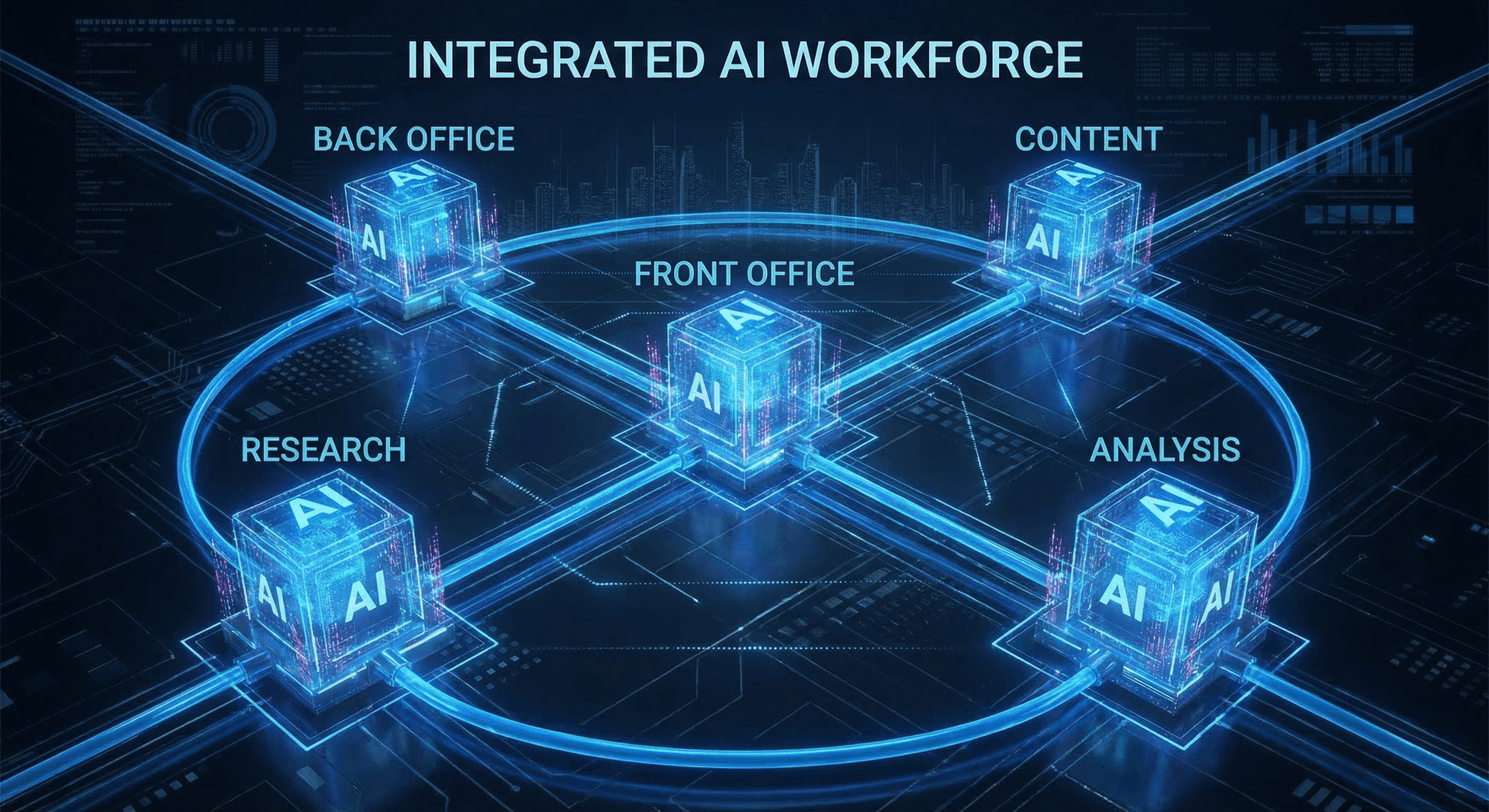
An AI workforce is a coordinated team of specialized AI employees, each one trained and configured for a distinct role inside your business. Just like a human workforce has a receptionist, an office manager, a researcher, a content writer, and an analyst, an AI workforce mirrors that structure with digital counterparts. Each AI employee has its own knowledge base, its own set of tools, its own rules for when to act and when to escalate. And critically, they work together — the data one AI employee captures becomes the input another one uses.
That coordination is what separates an AI workforce from a drawer full of disconnected subscriptions. A business that buys a chatbot from one vendor, a scheduling bot from another, and a content tool from a third ends up with three systems that do not talk to each other. The chatbot captures a lead but the scheduling bot does not know about it. The content tool writes a blog post but it has no access to the customer questions the chatbot is fielding every day. Each tool works in isolation, and you end up doing the integration work yourself — which usually means a human copying data from one screen to another.
An integrated AI workforce eliminates that gap. Our AI Employee service is built on this principle. When your Front Office AI books an appointment, your Back Office AI updates the CRM, sends a confirmation, and triggers a reminder sequence. When your Research AI identifies a trending customer question, your Content AI can draft a blog post addressing it. When your Analysis AI spots a drop in conversion rates, it surfaces the data your team needs to respond — all without anyone toggling between tabs.
For Fort Wayne businesses, this matters more than it does for companies in larger markets. A business in Chicago or Indianapolis might have a 20-person admin team that can absorb inefficiency. A 15-person HVAC company in Fort Wayne or a solo-practice attorney in Auburn cannot. When your team is lean, every hour of wasted effort is an hour you cannot afford to lose. An AI workforce — powered by AI automation and guided by AI consulting — gives small and mid-size businesses the operational capacity that used to require a much larger headcount.
This guide covers everything you need to know to build one. We will walk through the five core components, the Fort Wayne labor market context that makes this particularly relevant right now, a detailed six-week implementation plan, real stories from local deployments, honest ROI analysis, common mistakes, and the things AI still cannot do. By the end, you will have a clear picture of what building an AI workforce actually looks like — and whether it makes sense for your business.
The 5 Components of an AI Workforce
An AI workforce is not a single bot that does everything. It is a team of specialized AI employees, each trained for a specific role. Here are the five roles we deploy most often for Fort Wayne businesses, with deep explanations of what each one does and how it works in practice. For a comprehensive task list, see 98 things an AI Employee can do.
1. Front Office AI
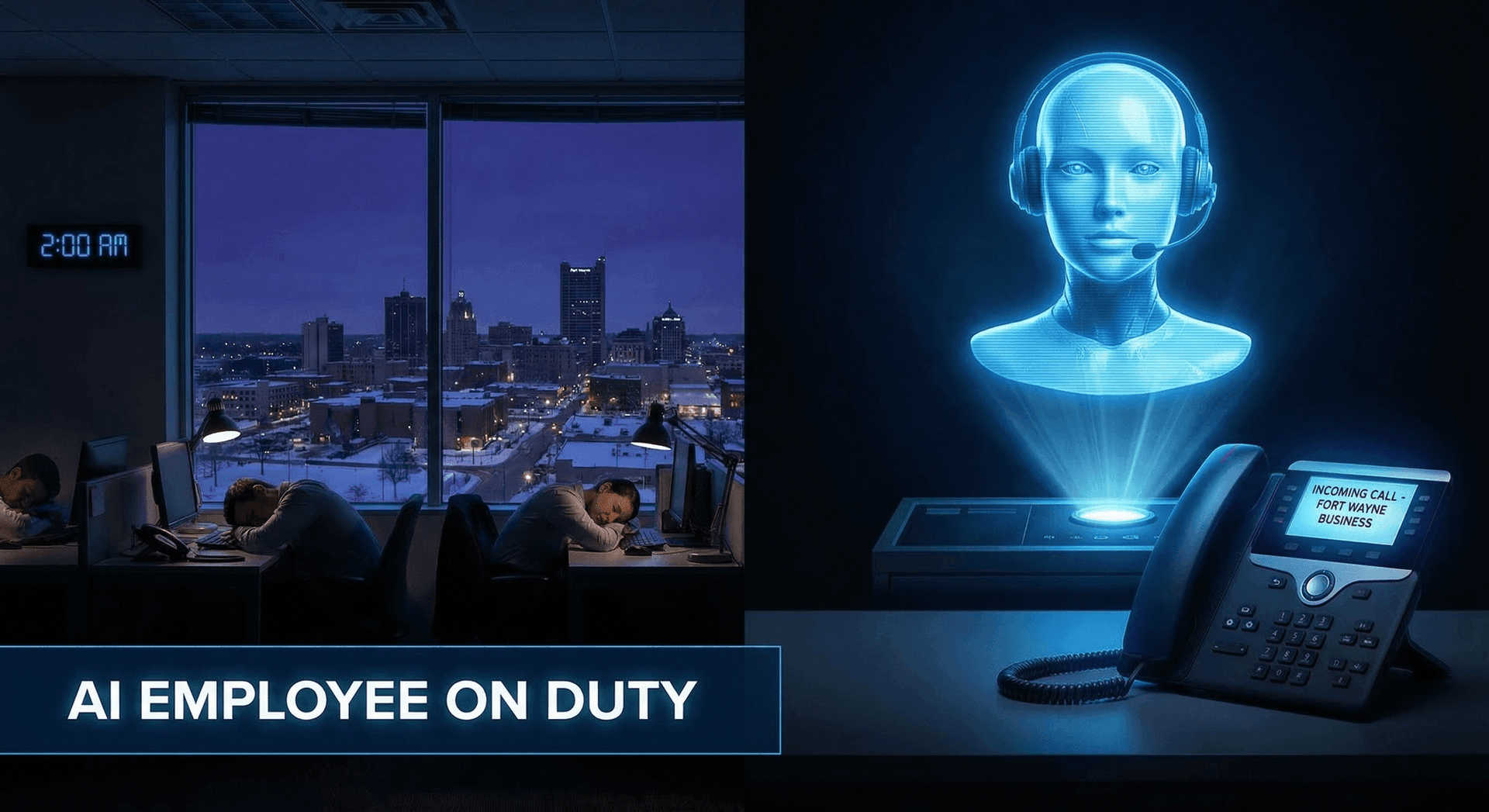
Your Front Office AI is the first point of contact for every customer interaction. It answers inbound phone calls with natural, conversational voice. It responds to text messages and web chat inquiries in real time. It books appointments directly into your calendar. It qualifies leads based on your specific criteria — budget, location, timeline, service type. And it does all of this 24 hours a day, 7 days a week, 365 days a year, including holidays, snowstorms, and 2 AM on a Tuesday.
For most Fort Wayne service businesses, this is where AI delivers the fastest and most measurable return on investment. The reason is simple: missed calls are missed revenue. Based on our deployments with local businesses like Factory Direct Homes Center and the DeKalb County Sheriff Office, and from what business owners tell us during consultations, many companies miss a meaningful share of inbound calls during business hours due to staff being on other calls, at lunch, or handling in-person customers. After hours, the number is closer to 100% — every call goes to voicemail, and industry data consistently shows that a significant majority of callers who reach voicemail will call a competitor instead of leaving a message.
Consider a practical example. A mid-size HVAC company in the Fort Wayne area — let us call them a composite of several businesses we have worked with — runs a team of 12 technicians and 3 office staff. During heating season (November through February), their call volume doubles. The office team physically cannot keep up. Calls ring out. Customers call someone else. The owner knows they are losing business but cannot justify hiring two more full-time receptionists for a seasonal spike.
A Front Office AI solves this problem structurally. It handles unlimited concurrent calls. It never puts a customer on hold. It knows the company's services, pricing ranges, and scheduling availability because it was trained on that data. When a homeowner calls at 7 PM because their furnace stopped working, the AI can assess the urgency, check the on-call technician's availability, book an emergency service call, send the customer a confirmation text, and notify the technician — all within the same call.
The AI also handles the repetitive questions that consume your office staff's day. “What are your hours?” “Do you service my area?” “How much does a furnace inspection cost?” “Can I reschedule my appointment?” These questions account for a large share of inbound calls for most service businesses. When the AI handles them, your human staff gets to focus on complex issues, upset customers who need a personal touch, and the in-person interactions that build long-term relationships.
- Answers inbound calls with natural, human-like conversation
- Books, reschedules, and cancels appointments directly in your calendar
- Qualifies leads based on your custom criteria
- Routes urgent requests to on-call staff with full context
- Follows up on missed calls, no-shows, and cancellations
- Handles unlimited concurrent calls with zero hold time
- Sends confirmation texts and reminder sequences automatically
The After-Hours Advantage
2. Back Office AI
Back Office AI handles the operational work that keeps a business running but rarely gets the attention it deserves: data entry, CRM updates, invoice processing, appointment confirmations, document routing, insurance verification, lead follow-up sequences, and internal communication workflows. These are the tasks that everyone agrees should be automated but that somehow still consume a significant portion of staff time every week.
The reason these tasks persist is that they require judgment in small doses. A purely mechanical automation can send a reminder email, but it cannot read a customer's reply that says “Actually, can we move it to Thursday?” and figure out what to do next. A Back Office AI can. It understands natural language, interprets intent, and takes the appropriate action — rescheduling the appointment, updating the CRM, and sending a new confirmation — without a human ever touching it.
Kyle Dudgeon at Factory Direct Homes Center provides a clear example of what Back Office AI looks like in practice. Kyle's business involves high-touch customer communication at every stage — initial inquiry, scheduling walkthroughs, financing discussions, order tracking, and delivery coordination. Before deploying Ava, his AI employee, these touchpoints were managed manually by his team. Every text, every follow-up, every status update required someone to stop what they were doing and respond.
Ava now handles the repetitive communication layer. She manages appointment scheduling, sends follow-up messages after walkthroughs, answers common questions about inventory and pricing, and keeps Kyle's CRM updated in real time. Kyle's team still handles the nuanced conversations — the financing negotiations, the custom order details, the moments where a customer needs reassurance from a human being. But the volume of routine communication that used to bury them is now handled automatically, and handled well.
The operational impact of Back Office AI is less glamorous than Front Office AI — nobody writes a press release about faster CRM updates — but it compounds over time. Every hour saved on data entry is an hour your team can spend on revenue-generating or relationship-building work. Over a year, those recovered hours add up — and for many businesses, they represent meaningful capacity that would otherwise require additional hires.
Back Office AI is also where integration matters most. A Back Office AI that connects to your CRM, your scheduling platform, your invoicing tool, and your communication channels creates a single source of truth. Instead of information living in five different systems that your staff manually keeps in sync, the AI keeps everything aligned automatically. For Fort Wayne businesses running lean teams, this eliminates a category of error and frustration that most owners have simply learned to live with.
- CRM updates and contact management across platforms
- Invoice processing and payment follow-ups
- Appointment confirmations, reminders, and rescheduling
- Insurance verification and document routing
- Lead nurture sequences based on customer behavior
- Internal workflow routing and task assignment
3. Research & Intelligence
A Research AI employee monitors your competitive landscape, tracks market trends, analyzes customer feedback, and surfaces insights that your team would never have the time to find manually. It turns raw, scattered data into structured, actionable intelligence delivered on your schedule.
This role is less obvious than Front Office or Back Office AI, but for businesses in competitive or rapidly changing markets, it can be transformational. Consider a Fort Wayne manufacturer — one that produces custom metal fabrication for the automotive and defense sectors. Their competitive advantage depends on knowing what their competitors are quoting, what materials prices are doing, which RFPs are hitting the market, and what their customers are saying about them online.
Before deploying a Research AI, this manufacturer's sales director spent several hours each week on competitive intelligence: scanning competitor websites, reading industry publications, monitoring government procurement sites, and compiling notes in a spreadsheet that was always out of date by the time anyone read it.
A Research AI automates the collection and synthesis layer. It monitors competitor pricing pages, social media accounts, job postings (a leading indicator of strategic direction), and press releases. It tracks raw materials pricing from commodity exchanges. It scans government procurement databases for relevant RFPs. And it compiles all of this into a structured weekly brief that lands in the sales director's inbox every Monday morning — with the key changes highlighted, trends identified, and recommended actions suggested.
The sales director still makes the strategic decisions. The AI does not decide which RFPs to bid on or how to price a quote. But instead of spending her Mondays gathering data, she spends them acting on it. That shift — from data collection to data-informed action — is where Research AI creates the most value.
Research AI is also valuable for tracking customer sentiment. For any Fort Wayne business with a meaningful online presence, understanding what customers are saying across Google reviews, social media, and industry forums is critical. A Research AI can monitor all of these channels, flag emerging concerns, identify praise that should be amplified, and track sentiment trends over time. Instead of discovering a negative review three weeks after it was posted, you know about it within hours.
- Competitive monitoring across websites, social, and job postings
- Market trend analysis with structured weekly or daily briefs
- Customer sentiment tracking across review platforms
- RFP and procurement opportunity identification
- Pricing intelligence and materials cost tracking
- Industry news curation relevant to your specific sector
4. Content Production
Content AI generates blog posts, social media updates, email campaigns, newsletter content, and marketing copy based on your brand voice, industry expertise, and target audience. It does not replace your creative vision — it accelerates execution so you can publish consistently without burning out your team or paying a content agency $5,000 a month.
The content challenge for most Fort Wayne businesses is not a lack of ideas. It is a lack of execution capacity. The owner of a roofing company knows more about roof maintenance than anyone in Allen County, but he does not have 4 hours a week to write blog posts about it. The managing partner at an accounting firm has deep expertise in tax strategy for small businesses, but she is not going to write LinkedIn posts between client meetings. The knowledge exists. The time to turn it into content does not.
Skywalker, Cloud Radix's own AI employee, illustrates how Content AI works in practice. Skywalker drafts blog content based on our content calendar, customer questions, and SEO research. He writes social media updates that match our voice and tone guidelines. He produces email sequences for different stages of our client journey. And he does this at a volume and consistency that our small human team could not sustain on their own.
The key word there is “drafts.” Every piece of content Skywalker produces goes through human review before publication. Our team edits for accuracy, adds personal anecdotes and client-specific details, and ensures the tone matches what we want our brand to feel like. The AI handles the bulk of content production — research, structuring, and first-draft writing. The humans handle the part that requires judgment, creativity, and the kind of nuance that comes from actually knowing your clients.
This hybrid approach is important. Pure AI-generated content, published without human review, tends to be correct but bland. It lacks the specific details, local references, and personality that make content resonate with a Fort Wayne audience. Content AI is a powerful accelerator, but it works best when paired with a human editor who adds the final layer of authenticity.
For businesses that have never maintained a consistent content calendar, Content AI makes it achievable for the first time. Instead of publishing one blog post every three months when someone finds the time, you publish weekly. Instead of posting on social media sporadically, you maintain a consistent presence. Over 6 to 12 months, this consistency compounds into meaningful organic search visibility and brand awareness — outcomes that are nearly impossible to achieve with sporadic content efforts.
Human Review Still Matters
5. Analysis & Reporting
An Analysis AI employee consolidates data from your CRM, phone system, website analytics, financial tools, and operational platforms into clear, actionable reports. Instead of your team spending Friday afternoons pulling spreadsheets and building pivot tables, the AI delivers weekly performance summaries with trends, anomalies, and recommendations — automatically, on schedule, in a format that is actually useful.
For a professional services firm — an accounting practice, a law firm, a consulting agency — Analysis AI addresses one of the most persistent operational challenges: understanding where your time and revenue are actually going. Most professional services businesses track time, bill clients, and have some form of financial reporting. But connecting those dots — seeing which services are most profitable, which clients consume disproportionate resources, where utilization is slipping, and what the pipeline looks like three months out — requires analysis that nobody has time to do.
An Analysis AI for a Fort Wayne professional services firm might pull data from a time-tracking platform, an accounting system, and a CRM, then produce a weekly report that shows: revenue by service line, utilization rate by team member, average days to payment by client category, pipeline value by stage, and a 90-day revenue forecast based on current trends. The managing partner gets this report every Monday morning and can make decisions based on current data instead of gut feeling.
Analysis AI also excels at anomaly detection — flagging things that look unusual before they become problems. If a normally profitable client's hours are spiking without corresponding revenue, the AI flags it. If a service line's margin is declining over three consecutive months, the AI surfaces the trend. If accounts receivable aging is creeping up, you know about it before it becomes a cash flow issue.
For business owners who want to make data-driven decisions but do not have the time or inclination to wade through dashboards and spreadsheets, Analysis AI is the role that transforms how you run your business. It does not make decisions for you. It makes sure you have the information you need to make good decisions, delivered in a format you will actually read.
| Role | Primary Function | What It Handles | Best For |
|---|---|---|---|
| Front Office | Customer interaction & lead capture | Calls, scheduling, lead qualification | Service businesses |
| Back Office | Admin, CRM, & workflow automation | Data entry, follow-ups, document routing | Any business with admin volume |
| Research | Market & competitive intelligence | Competitor monitoring, trend analysis | Competitive or fast-moving markets |
| Content | Blog, social, & email production | Drafts, scheduling, SEO optimization | Growth-focused businesses |
| Analysis | Data consolidation & reporting | Dashboards, anomaly detection, forecasts | Data-driven leaders |
The Fort Wayne Labor Market Context
Fort Wayne and northeast Indiana are in a unique labor market position, and understanding it helps explain why AI workforces are gaining traction here faster than in many other regions.
Indiana's unemployment rate has been tracking below the national average for several years. According to the Bureau of Labor Statistics, the state's unemployment rate sat at approximately 3.4% as of late 2025, and the Fort Wayne metropolitan area has generally been at or below that number. Low unemployment sounds like a good thing — and it is, for workers — but for business owners trying to hire, it means the talent pool is thin. The people you want to hire are already employed somewhere else, and recruiting them means competing on wages and benefits.
Wage pressure in northeast Indiana has increased accordingly. The Indiana Department of Workforce Development reported that average wages in the Fort Wayne MSA have risen steadily, and businesses in sectors like manufacturing, healthcare, and professional services have seen particularly sharp increases. For small businesses that cannot match the pay and benefits offered by companies like Sweetwater, Lutheran Health, or Parkview, attracting and retaining talent is a persistent challenge.
Turnover compounds the problem. The Society for Human Resource Management (SHRM) estimates the average cost of replacing an employee at roughly 50% to 200% of their annual salary, depending on the role. For a customer service representative earning $35,000, that means $17,500 to $70,000 in recruiting, onboarding, training, and lost productivity costs every time someone leaves. Many Fort Wayne businesses experience annual turnover rates of 20% or higher in customer-facing and administrative roles, which means they are effectively paying that replacement cost every year.
Here is the important nuance: an AI workforce does not solve the labor market problem by replacing humans. It solves it by changing what you need humans for. Instead of hiring three people to handle phones, data entry, and scheduling — roles that are hard to fill and have high turnover — you deploy AI for those functions and hire one person for a role that requires human judgment, relationship skills, and creative problem-solving. That role is easier to fill because it is more interesting, it pays better (because you are not spreading your budget across three positions), and the person you hire stays longer because the work is more fulfilling.
This is particularly relevant for Fort Wayne's manufacturing sector, which employs a significant share of the local workforce. Manufacturers face a dual challenge: they need skilled production workers (who are increasingly hard to find) and they need administrative support to manage quotes, orders, quality reports, and customer communication. AI workforces address the administrative side, freeing the business to focus its human recruitment efforts on the skilled production roles that truly require a person on the floor.
The Fort Wayne market is also uniquely positioned to benefit from AI workforces because of its business mix. The metro area is home to a high concentration of small and mid-size businesses — companies with 5 to 100 employees that are big enough to have real operational complexity but too small to have dedicated IT departments or large admin teams. These are exactly the businesses where an AI workforce delivers the most relative impact: the operations are complex enough to benefit from automation, but the team is lean enough that every efficiency gain is felt immediately.
The 6-Week Implementation Deep Dive
Deploying an AI workforce is not an overnight switch. It is a structured rollout designed to minimize disruption, maximize results, and give your team time to adapt. Here is the detailed week-by-week process we use with Fort Wayne businesses, along with what to expect and what questions to ask at each stage.
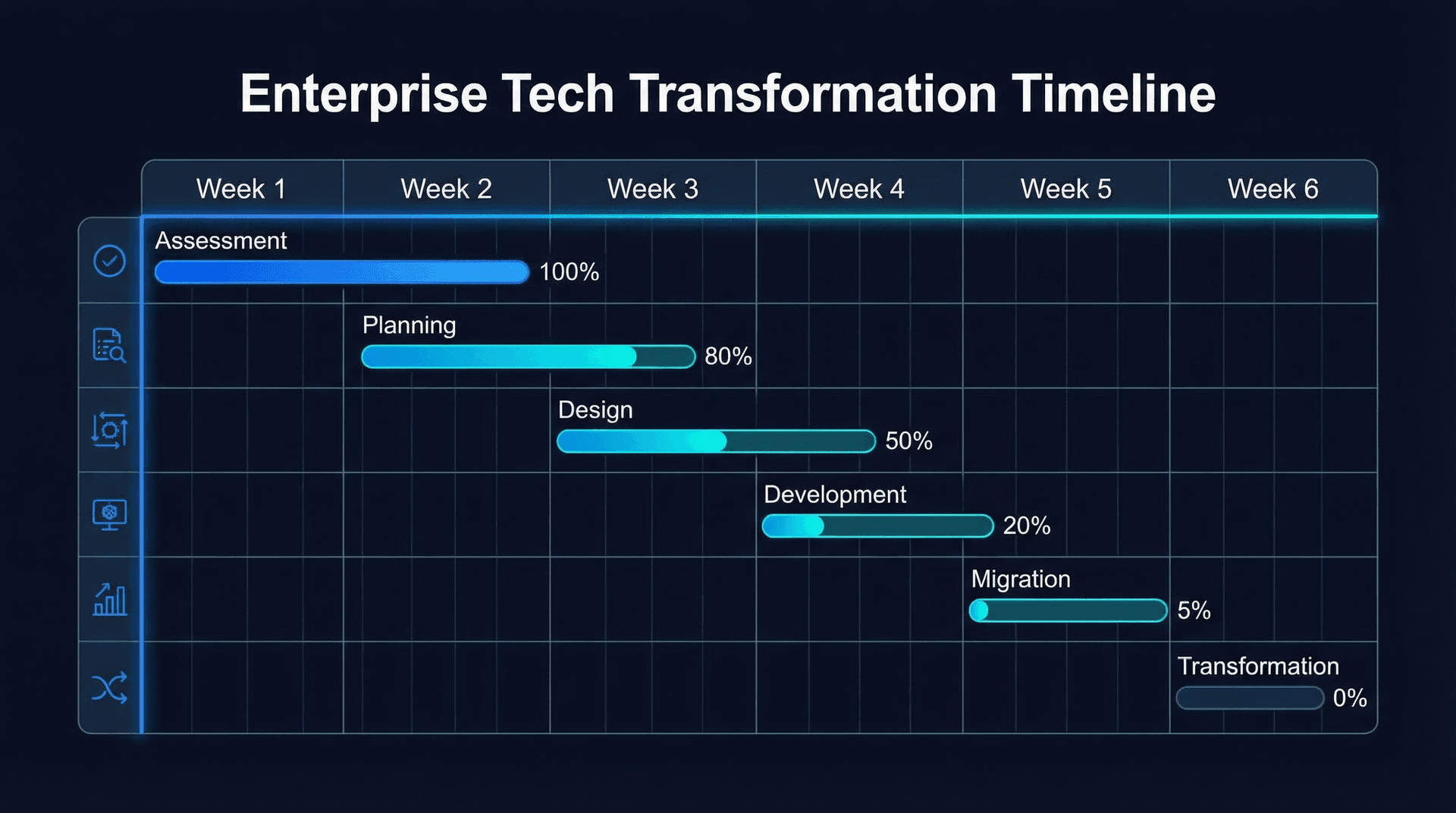
Week 1: Discovery & Process Mapping
The first week is about understanding your business deeply enough to build AI employees that actually work. This is the most important week in the entire process, and skipping or rushing it is the single biggest predictor of a disappointing deployment.
During discovery, we conduct stakeholder interviews with everyone who will interact with the AI workforce — owners, managers, front desk staff, salespeople, and office administrators. We want to understand not just what processes happen, but why they happen, what goes wrong, and where the pain points are. A process map drawn from an org chart looks very different from a process map drawn from talking to the person who actually does the work every day.
We also analyze your data during this week. Call volume patterns (how many calls per day, per hour, what percentage are after hours), inquiry types (what are the top 20 questions customers ask?), scheduling patterns, and common failure points. If you have call recordings, we review a sample to understand how your team currently handles interactions and where a customer's experience could be improved.
By the end of Week 1, you have a prioritized list of AI roles, a detailed process map for each one, and a clear deployment sequence. The most common starting point is Front Office AI because it has the most immediate, measurable impact. But for some businesses — particularly those with strong phone staff but overwhelmed back offices — starting with Back Office AI makes more sense.
- Stakeholder interviews with your team (typically 2-4 hours total)
- Call and inquiry volume analysis
- Process documentation for all target workflows
- Review of existing tools and integration points
- Priority ranking: which AI role ships first and why
- Timeline and milestone agreement
Questions to Ask During Discovery
Week 2: Configuration & Training
Week 2 is where the AI employee takes shape. Using the process maps and data from Week 1, we configure the first AI role — typically Front Office — with your specific business knowledge. This is not a generic setup. The AI is trained on your services, your pricing, your scheduling rules, your service area, your tone of voice, and the specific way your business handles customer interactions.
For a Fort Wayne HVAC company, this means the AI knows the difference between a furnace tune-up and a heat exchanger replacement. It knows your service area covers Allen County and parts of Whitley and Noble counties. It knows that emergency service is available after hours but carries a premium. It knows that you do not service commercial buildings over 10,000 square feet. These details matter because they are what make the AI feel like a knowledgeable member of your team rather than a generic answering service.
We also configure escalation rules during this week. Every AI employee needs clear boundaries — situations where it should stop trying to handle the interaction and connect the customer with a human. These typically include: angry or upset customers, requests involving legal or safety concerns, complex billing disputes, and any situation where the customer specifically asks to speak to a person. Getting these escalation rules right is critical to maintaining customer trust.
Integration work also happens during Week 2. We connect the AI to your existing tools — your calendar, CRM, phone system, and communication platforms. This is usually the most technical part of the process, and it is where having a team that has done this before pays off. Most common business tools have well-established integration methods. Niche or custom platforms may require additional configuration time.
Week 3: Internal Testing
Before any customer interacts with your AI employee, your team tests it extensively. We run through real scenarios — the easy ones, the hard ones, and the weird ones. Your receptionist calls and asks the 20 most common customer questions. Your manager tries to break it with edge cases. Someone calls pretending to be an angry customer. Someone asks a question that has nothing to do with your business.
The goal of internal testing is to reach a 90%+ autonomous resolution rate. That means 90% of interactions are handled by the AI without needing a human. The remaining 10% are successfully identified and escalated with full context. No customer gets stuck in a loop. No customer gets wrong information. No customer gets frustrated because the AI will not let them talk to a person.
This week also includes team training. Your staff needs to understand what the AI does, what it does not do, how escalations work, and how to monitor its performance. This is not technical training — your team does not need to understand the AI's architecture. They need to understand the workflow: how a customer reaches the AI, what happens during the interaction, when and how a human gets pulled in, and where to find the logs and recordings.
Based on our experience, the biggest concern during this week is usually your team's anxiety about being replaced. Address this directly. The AI handles the repetitive volume so they can do more interesting, valuable work. Most teams, once they see the AI in action, shift quickly from skepticism to enthusiasm — especially when they realize how much tedious work is about to disappear from their day.
Week 4: Soft Launch
The AI employee goes live on a limited subset of your traffic. Typically, this means after-hours calls only, or a specific inquiry channel like web chat. This limits exposure while generating real-world performance data under actual conditions.
During the soft launch, we monitor every interaction. We review call recordings, chat transcripts, and customer feedback. We measure resolution rates, customer satisfaction, escalation frequency, and booking accuracy. If something is not working — a question the AI handles poorly, an escalation that should trigger but does not, a response that sounds awkward — we fix it the same day.
The soft launch typically runs for 5 to 7 days. Most AI employees perform well enough during this period to move to full deployment, but some need an additional few days of refinement. There is no rush. The goal is confidence, not speed.
Week 5: Full Deployment
With soft-launch data validated, the first AI employee handles all incoming traffic for its role — every call, every chat, every inquiry, 24/7. Your human team shifts to handling escalations, reviewing AI performance, and focusing on the work that requires their unique skills.
Simultaneously, we begin configuring the second AI employee role. The first deployment generates a wealth of data — common customer questions, peak interaction times, frequent scheduling patterns, recurring admin tasks — that informs how we build the next role. Each subsequent AI employee is easier and faster to deploy because it builds on context from the ones already running.
Week 6: Optimization & Expansion
The first AI employee is fully operational and continuously improving based on real interaction data. During this week, we conduct a formal performance review with your team: What is working well? What needs adjustment? What surprised you? What do customers say?
We also plan the expansion roadmap. Most Fort Wayne businesses are running two or three AI employees by the end of month two. The sequence depends on your priorities: if lead generation is the focus, Content AI might be next. If operational efficiency matters more, Back Office AI takes priority. If competitive pressure is high, Research AI delivers the most strategic value.
By the end of Week 6, you have a working AI workforce, a clear performance baseline, and a plan for expansion. The initial deployment is done, but the optimization never stops — AI employees get better over time as they process more interactions and learn from edge cases.
Real Deployment Stories
Theory is useful, but real deployments are what matter. Here are honest descriptions of AI workforce deployments for Fort Wayne businesses — what works, what was harder than expected, and what the actual results look like.
Kyle Dudgeon — Ava AI
Kyle's business, Factory Direct Homes Center, involves a long and communication-intensive customer journey. From initial inquiry to delivery, a single customer might have dozens of touchpoints with the business — scheduling walkthroughs, discussing floor plans, coordinating financing, tracking orders, and scheduling delivery. Each touchpoint requires a response, and response speed matters for customer satisfaction and conversion.
Ava AI handles the routine communication layer of this process. She responds to initial inquiries, schedules walkthrough appointments, sends follow-up messages, answers frequently asked questions about inventory and process timelines, and keeps Kyle's CRM current with every interaction. Kyle and his team handle the high-judgment conversations — financing discussions, custom order details, and the relationship-building moments that differentiate his business from competitors.
What Kyle found is that Ava's most valuable contribution was not any single task but the cumulative time savings across all the small tasks. No single text message or calendar update is a big deal. But when you add up hundreds of them per month, the administrative burden is substantial. Removing that burden let Kyle's team focus on the work that actually drives revenue and customer loyalty.
Skywalker — Cloud Radix
We deploy the same technology we sell to clients. Skywalker is Cloud Radix's own AI employee, handling initial client inquiries, qualifying leads, scheduling demos, answering questions about our services, and producing first-draft content for our blog and social channels.
The honest assessment: Skywalker is excellent at handling structured interactions — answering questions about pricing, explaining our services, scheduling meetings, and drafting content outlines. He is less effective when conversations require deep strategic nuance or when a prospective client needs to hear from a human to build trust. We designed Skywalker's escalation paths with this in mind: any conversation that moves beyond initial qualification gets routed to our human team.
Skywalker handles roughly 60% of initial client interactions end-to-end, saving our human team an estimated 15 to 20 hours per week. For a small company like Cloud Radix, that is the equivalent of a part-time employee dedicated entirely to lead qualification and content production.
A Pattern Across All Deployments
ROI Analysis
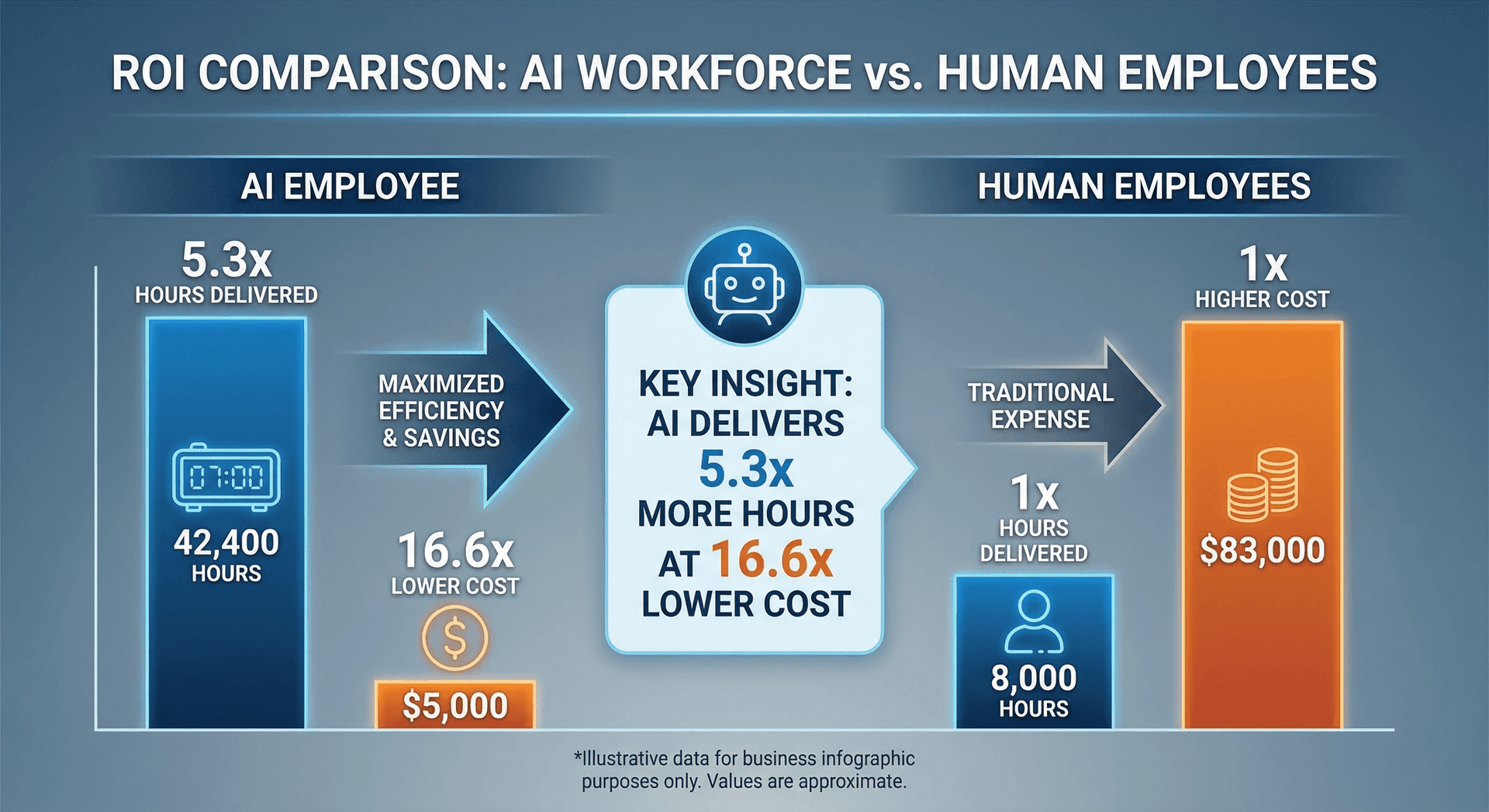
Let us talk numbers. The comparison below uses real cost data from Fort Wayne deployments and Bureau of Labor Statistics wage data for the Fort Wayne metropolitan area. Your results will vary based on your industry, volume, and staffing situation — this is a representative scenario, not a guarantee.
| Cost Category | Human Workforce (3 roles) | AI Workforce (3 roles) |
|---|---|---|
| Base Salary / Subscription | $108,000/yr | $28,692/yr |
| Benefits & Taxes (est. 30%) | $32,400/yr | $0 |
| Recruiting & Onboarding | $9,600/yr | $3,500 (one-time setup) |
| Training & Development | $4,800/yr | Handled by Cloud Radix |
| Turnover Replacement (est. 20%/yr) | $7,200/yr | $0 |
| API & Infrastructure Costs | N/A | $8,592/yr |
| Total Year 1 | $162,000 | $40,784 |
| Total Year 2 (ongoing) | $162,000+ | $37,284 |
| Availability | 40 hrs/week per person | 168 hrs/week (24/7) |
How we calculated these numbers: The human workforce column assumes three administrative/customer service roles at Fort Wayne-area median wages of approximately $36,000 each (per BLS data for the Fort Wayne MSA), plus a standard 30% benefits and tax burden. Recruiting costs assume approximately $3,200 per hire. Turnover costs assume 20% annual turnover — meaning roughly one of the three roles turns over each year — at a conservative replacement cost.
The AI workforce column reflects actual Cloud Radix pricing for a mid-range deployment covering three AI employee roles: Front Office, Back Office, and one additional role (Content, Research, or Analysis). For a line-by-line breakdown, see our AI Employee pricing guide. API and infrastructure costs are listed separately because they fluctuate based on usage volume. A business with very high call volume or complex integrations will see higher API costs. A lower-volume business will see less. We disclose these costs separately so you always know what is driving your bill.
What this comparison does not show: The revenue impact of 24/7 availability. If your business currently misses after-hours calls and each missed call has a meaningful value, the recovered revenue from AI call capture can offset a significant portion of the AI workforce cost. But because revenue recovery depends heavily on your specific business model and close rate, we do not include it in the cost comparison — we think that would be misleading.
What Humans Do That AI Cannot — And Why It Matters for ROI
An honest ROI analysis has to acknowledge what AI employees cannot do. They cannot build genuine personal relationships. They cannot read a room during an in-person meeting. They cannot have the creative insight that transforms a business strategy. They cannot provide the emotional support that an upset customer sometimes needs. And they cannot do physical work.
This matters for ROI because the right comparison is not “AI versus humans” — it is “AI plus humans versus humans alone.” The AI handles the volume, the routine, the nights and weekends. The humans handle the judgment, the relationships, and the creativity. Together, they produce outcomes that neither could achieve alone.
A Fort Wayne HVAC company does not replace its best technician with an AI. It deploys AI to handle the phones so the technician never has to stop working on a furnace to answer a scheduling question. The technician's productivity goes up because interruptions go down. The customer experience improves because calls get answered instantly. And the business captures revenue it was previously losing to voicemail. That is the real ROI story.
Common Mistakes to Avoid
Through our deployments with Factory Direct Homes Center, the DeKalb County Sheriff Office, and our own Cloud Radix operations — plus conversations with businesses evaluating AI — we have seen patterns in what works and what does not. Here are the mistakes we see most often and how to avoid each one.
Mistake 1: Trying to Automate Everything at Once
The impulse to deploy AI across every function simultaneously is understandable. You see the potential, and you want the full benefit immediately. But comprehensive, simultaneous deployment leads to messy rollouts, overwhelmed teams, and an AI workforce that is mediocre at five things instead of excellent at one.
We have seen this play out with businesses outside Fort Wayne that tried to deploy five AI roles in the same week. The result was confusion: staff did not know which system handled what, customers got inconsistent experiences across channels, and the data flowing between AI employees was unreliable because none of them had been properly calibrated. The business ended up pulling most of them offline and starting over with a single role — which is where they should have started.
The fix: Start with one high-impact role, typically Front Office AI. Prove the value, let your team adapt, and build from there. Each subsequent deployment benefits from the data and experience of the ones before it.
Mistake 2: Skipping or Rushing the Training Phase
An AI employee is only as good as its training data. Businesses that rush through the configuration phase — feeding the AI generic information instead of their actual scripts, real pricing, specific policies, and authentic brand voice — end up with an AI that sounds vaguely competent but gives wrong or incomplete answers.
The most common version of this mistake is providing the AI with brochure-level information when it needs operational-level detail. Your marketing website says “We offer comprehensive HVAC services.” Your AI needs to know that a furnace tune-up costs $89, takes 60 to 90 minutes, should be scheduled at least 48 hours in advance, and is available Monday through Friday between 8 AM and 4 PM. The gap between those two levels of specificity is where customer frustration lives.
The fix: Invest the time in Week 2 of the implementation plan. Provide your actual scripts, real pricing sheets, scheduling rules, and the answers to the 50 most common customer questions. This is a one-time investment that pays dividends for months.
Mistake 3: No Escalation Paths
Every AI employee needs clear, well-defined rules for when to stop handling an interaction and transfer it to a human. Without escalation paths, edge cases become customer frustrations. The AI keeps trying to help when it should be connecting the customer with someone who can actually resolve their issue.
We worked with one business that initially deployed their AI without a clear escalation trigger for billing disputes. A customer called about an incorrect charge, and the AI — which was trained on general customer service but not authorized to process refunds or adjustments — kept trying to address the concern with information instead of routing the call. The customer got frustrated and left a negative review. The fix took 15 minutes: add a billing dispute trigger that immediately transfers to a human. That 15-minute fix would have prevented the problem entirely.
The fix: Define your escalation triggers before going live. Common triggers include: angry or upset customer (detected by tone or explicit statement), complex billing questions, legal or safety concerns, requests for a manager, and any topic the AI was not trained on. When in doubt, escalate.
Mistake 4: Expecting Zero Maintenance
AI employees improve over time, but they are not set-and-forget. Your business changes — new services, updated pricing, seasonal promotions, new team members, revised scheduling rules — and your AI needs to change with it. Businesses that deploy an AI employee and then ignore it for six months end up with an AI that gives outdated information, which is worse than having no AI at all.
The fix: Budget 1 to 2 hours per month for review and updates. Review the AI's performance data, listen to a sample of interactions, and update any information that has changed. Cloud Radix handles the technical maintenance, but you know your business better than anyone. A monthly check-in keeps your AI employee current and effective.
Mistake 5: Hiding the AI From Customers
Some businesses worry that customers will react negatively to learning they are talking to an AI. Our experience, across every Fort Wayne deployment, is that this concern is almost always unfounded. Customers care about speed, accuracy, and helpfulness. Whether those qualities come from a human or an AI matters far less than whether the customer gets their problem solved.
More importantly, transparency builds trust. When a customer discovers they have been talking to an AI without knowing it, they feel deceived — even if the interaction was positive. When a customer knows upfront that they are interacting with an AI assistant, their expectations are calibrated appropriately and they are more forgiving of minor imperfections.
The fix: Be straightforward. A simple “Hi, I am [name], [Business]'s AI assistant. I can help with scheduling, service questions, and general inquiries. If you need to speak with a person, just let me know” sets the right expectation and gives the customer control. In our experience, this approach leads to higher satisfaction than trying to make the AI pass as human.
Mistake 6: Measuring the Wrong Things
Some businesses measure AI success by the wrong metric — typically, “how often does the AI sound perfect?” The right metrics are operational: How many calls were answered that would have gone to voicemail? How many appointments were booked? How many hours of admin time were saved? What is the customer satisfaction score for AI-handled interactions? How frequently does the AI escalate appropriately?
The fix: Define your success metrics before deployment. Track them consistently. Review them monthly. The metrics that matter are the ones tied to business outcomes, not to subjective impressions of how human the AI sounds.
The Biggest Mistake of All
What an AI Workforce Cannot Replace
A guide about building an AI workforce that does not honestly address the limits of AI is not a guide worth reading. Here are the things that AI employees cannot do — and likely will not be able to do for a long time.
Human Judgment in Ambiguous Situations
AI employees excel at structured, rule-based decisions. When the situation maps cleanly to their training — “this customer wants to schedule a furnace inspection for next Tuesday” — they perform flawlessly. When the situation is ambiguous — a long-time customer who is upset about something that is not clearly the business's fault, a request that falls in a gray area between two policies, a negotiation that requires reading between the lines — AI reaches its limits.
Human judgment is the ability to weigh competing priorities, consider context that is not explicitly stated, and make a decision that balances business interests with human empathy. AI can simulate this to a degree, but it cannot truly replicate the lived experience and intuition that a skilled human brings to ambiguous situations.
Genuine Relationship Building
Business in Fort Wayne runs on relationships. The reason you have been going to the same accountant for 15 years is not because their tax preparation is objectively better than every alternative. It is because they know your family, they remember your kid's name, they asked about your vacation last year, and you trust them. That kind of relationship is built through shared human experience, and AI cannot replicate it.
An AI employee can be polite, responsive, and helpful. It can remember details and reference past interactions. But it does not build trust the way a human does, because trust — real trust — requires vulnerability, shared experience, and the knowledge that the person on the other end genuinely cares about you as a person, not just as a data point.
Physical Presence
AI employees live in the digital world. They cannot shake a hand, walk a job site, or sit across a table in a meeting. For businesses where physical presence is part of the value proposition — construction, healthcare, manufacturing, hospitality — AI handles the communication and administrative layers but cannot replace the human who shows up.
Creative Leadership
AI can generate content, analyze data, and surface insights. What it cannot do is set a vision, inspire a team, or make the kind of bold strategic bets that define great businesses. The decision to enter a new market, launch a new product, or pivot the company's direction requires the kind of creative leadership that emerges from passion, experience, and conviction — qualities that AI does not have.
Content AI can write a blog post, but it cannot decide what your brand should stand for. Analysis AI can identify a market opportunity, but it cannot decide whether pursuing it aligns with your values and long-term vision. Research AI can show you what competitors are doing, but it cannot tell you whether to follow or differentiate. These are leadership decisions, and they will remain human decisions for the foreseeable future.
Emotional Intelligence
There are moments in business — and in life — where what someone needs is not information or efficiency but empathy. A customer who just lost a family member and needs to cancel a service appointment. An employee who is struggling with something personal. A client who is frustrated not because anything went wrong but because they are having a bad day. In these moments, the right response is not optimized or efficient. It is human.
AI employees can detect emotional cues and respond with appropriate language. They can be trained to express sympathy and offer to connect the person with a human. But they cannot truly empathize, and most people can sense the difference. This is why escalation paths for emotional situations are so important: the AI recognizes the moment and gets a human involved quickly, rather than trying to simulate something it cannot authentically provide.
The Right Mindset

Frequently Asked Questions
Q1.How long does it take to build an AI workforce?
Most Fort Wayne businesses can deploy their first AI Employee within 1-2 weeks. Building a full AI workforce with multiple roles typically takes 4-6 weeks, including training, testing, and refinement. The timeline depends on your business complexity and how many processes you want to automate initially.
Q2.Do I need technical staff to manage an AI workforce?
No. Cloud Radix handles all technical management, monitoring, and updates. Your team interacts with AI Employees through conversations, dashboards, and escalation queues — the same way they would interact with any coworker. You manage outcomes, not infrastructure.
Q3.What happens when an AI Employee hits something it cannot handle?
Every AI Employee has built-in escalation paths. It routes edge cases to your human team with full context — the customer's question, what the AI already covered, and why it escalated. Over time, these edge cases become training data that makes the AI more capable.
Q4.Can I start with just one AI Employee and expand later?
Absolutely, and we recommend it. Start with Front Office AI, see the results, then expand into Back Office, Content, or Research roles. Each new AI Employee builds on the data and context from the ones already deployed, making subsequent deployments faster and more effective.
Q5.Will AI Employees replace my human staff?
No. AI Employees handle repetitive, high-volume tasks so your human team can focus on work that requires judgment, creativity, and personal relationships. Most of our Fort Wayne clients report that their teams prefer the change because the tedious work disappears and they get to focus on more meaningful work.
Q6.What if my business is seasonal?
AI workforces are particularly well-suited for seasonal businesses. They scale instantly during busy periods without recruiting costs and maintain consistent service during slow months when you cannot justify additional full-time hires. An HVAC company that triples its call volume in winter gets the same quality of service from the AI year-round.
Q7.Is the $40,892/year figure realistic?
That figure represents a mid-range deployment covering 3 AI Employee roles. Actual costs vary based on call volume, complexity, and API usage. Some businesses spend less; businesses with high-volume or specialized needs may spend more. API and infrastructure costs are disclosed separately and fluctuate with usage, so you always know what is driving your bill.
Q8.What industries benefit most from an AI workforce in Fort Wayne?
Any business with high call volume, repetitive administrative tasks, or customer-facing communication. We see the strongest results in home services (HVAC, plumbing, electrical), legal services, healthcare practices, manufacturing, and professional services. But the principles apply broadly to any business with structured, repeatable processes.
Q9.How do you handle data privacy and security?
All AI Employee interactions are encrypted in transit and at rest. We follow industry-standard security practices and can configure AI Employees to comply with HIPAA, PCI, or other regulatory requirements relevant to your industry. Your business data stays your business data — we do not use it to train models for other clients.
Q10.What is the difference between an AI workforce and just buying ChatGPT?
ChatGPT is a general-purpose language model. An AI Employee is a purpose-built system trained on your specific business data, connected to your actual tools, and designed to perform a specific role. The difference is like the difference between a general temp worker and a trained specialist who knows your company inside and out.
Q11.Can AI Employees integrate with my existing software?
Yes. AI Employees integrate with most CRM systems, scheduling platforms, phone systems, and business tools. We handle the integration during the configuration phase. If you use a custom or niche platform, we evaluate compatibility during the discovery week and let you know exactly what is possible.
Q12.What if I am not satisfied with the results?
We provide a transparent onboarding process with clear milestones at each stage. If an AI Employee is not meeting expectations after the optimization phase, we work with you to diagnose and resolve the issue. Our business model depends on long-term partnerships, not one-time sales, so your success is directly tied to ours.
Sources & Further Reading
We believe in backing claims with data. Here are the sources referenced in this guide, along with additional reading for business owners who want to go deeper.
- Bureau of Labor Statistics (BLS) — Indiana and Fort Wayne MSA unemployment rates, wage data, and occupational employment statistics. bls.gov/regions/midwest/indiana.htm
- Indiana Department of Workforce Development — Regional labor market data, wage trends, and employment projections for northeast Indiana. in.gov/dwd
- Society for Human Resource Management (SHRM) — Employee turnover cost benchmarks and retention research. shrm.org
- Cloud Radix deployment data — Cost figures, time savings, and performance metrics referenced in this guide are based on our experience deploying AI employees for Fort Wayne and northeast Indiana businesses. Individual results vary based on business size, industry, and deployment scope.
- Northeast Indiana Regional Partnership — Regional economic data, workforce development initiatives, and business climate reports for the 11-county northeast Indiana region. neindiana.com
- McKinsey Global Institute — The Economic Potential of Generative AI — Analysis of task automation potential across business functions, including estimates of productivity gains for small and mid-size businesses.
- Gartner — AI Agents Are the Next Frontier — Analyst predictions on AI agent adoption in business operations through 2028.
- National Federation of Independent Business (NFIB) — Small Business Economic Trends — Monthly surveys on hiring difficulty and labor costs facing small business owners nationwide.
Where statistics in this guide are described as “based on our experience” or “typical client results,” they reflect aggregate observations from Cloud Radix deployments and are not independently audited. We have noted where data comes from external sources. If you have questions about any specific claim, we are happy to discuss the underlying data.
Ready to Build Your AI Workforce?
We will map your business processes, identify the highest-impact AI roles, and give you a realistic timeline and cost estimate. No jargon, no pressure — just an honest conversation about what would help your business.
Schedule a Free ConsultationNo contracts. No pressure. Just a straightforward look at what AI can do for your Fort Wayne business.