
If you have deployed an AI employee against your own database, or you are about to, you have probably already heard the complaint that ends most pilots: “the agent queried the wrong tables.” It joined customers to orders on the wrong key. It pulled revenue from a deprecated view nobody has used since the last ERP migration. It invented a customer_status column that does not exist. The reflex is to treat this as a model problem and reach for the expensive fixes: a new retrieval layer, a fine-tuning run, a vector database for your schema, a vendor demo with a six-figure quote attached.
Here is the part almost nobody acts on. The single best asset for grounding an agent against a real business database is something you already own and pay nothing extra for: your SQL query logs. Every analyst query that ran in production is a recorded, validated example of which tables actually go together, which joins return correct results, and which patterns answer real business questions. Years of that history sits in your warehouse audit log, your database query store, your BI tool's run history. Most teams never look at it for this purpose. This piece is about operationalizing the artifact you have before you buy the ones you do not.
Key Takeaways
- AI agents hallucinate joins because raw schema alone does not tell them which tables actually go together or which keys are correct.
- Your production SQL query logs already encode validated join patterns, table relationships, and business intent from real analysts.
- Mining query history is the cheapest grounding technique available; you already own the data and the rights to it.
- Treat past analyst queries as ground truth: index which tables, joins, and patterns successfully answered real questions.
- This complements, and often defers, more expensive options like fine-tuning or a net-new retrieval stack.
- Start with a read-only export of 90 days of query logs and a human review of the top recurring patterns.
Why Do AI Employees Hallucinate Joins in the First Place?
When you point a text-to-SQL agent at a raw database schema, you are handing it a list of table names and column names with no context about how a competent analyst would actually use them. A schema tells the model that orders and line_items and order_archive_2019 all exist. It does not tell the model that nobody joins against the archive table anymore, or that the correct revenue figure comes from orders joined to payments on payment_id rather than the obvious-looking order_id. The model fills that gap by guessing, and guessing at scale produces confidently wrong SQL.
The scale of the problem grows with the size of your database. In enterprise BigQuery environments with 500 or more tables, analysis from typedef found that models can hallucinate table references over 60% of the time and column names over 40% of the time when querying unfamiliar datasets without schema constraints, with multi-join queries returning incorrect results 55–60% of the time under those same unconstrained conditions. Those figures come from that specific body of analysis rather than being a universal law, but they match what mid-market teams report anecdotally: the more tables you have, the worse the guessing gets, because there are simply more plausible-looking wrong answers to choose from.
Part of the fix is well understood. A “RAG for database schema” approach, described by Wren AI, reduces hallucinations because the model sees fewer irrelevant table names to confuse it. Narrow the candidate set and the error rate falls. But schema retrieval alone still leaves the hardest question unanswered: of the relevant tables, how do they actually connect? That is the join problem, and a list of foreign keys does not solve it because real businesses join across keys that were never formally declared. The missing ingredient is not more schema. It is evidence of how the schema gets used.

What Context Do Your SQL Query Logs Actually Contain?
A production query log is not just a list of strings. Parsed correctly, every historical query is a labeled training example produced by a human who needed a correct answer and got one. The primary argument here, laid out by VentureBeat's reporting, is that historical SQL query logs encode the joins, tables, and patterns that real analysts have used and validated, and that turning years of analyst query history into a living, retrievable knowledge base lets an agent reuse joins that have worked before rather than guessing from raw schema.
Break down what a single recurring query reveals once you parse it:
| Signal in the log | What it grounds for the agent |
|---|---|
| Which tables co-occur in FROM/JOIN clauses | Which tables actually go together |
| The exact ON conditions used | The correct join keys, including undeclared ones |
| Filter and WHERE patterns | Business definitions (e.g. what “active customer” means) |
| Frequency and recency of a query shape | Which patterns are canonical vs. abandoned |
| The analyst or team that ran it | Provenance and trust weighting |
This is exactly the approach tooling is converging on. TechBooky's coverage of DataHub describes its Context Intelligence feature analyzing existing SQL query history to build a semantic index of which tables, joins, and patterns have successfully answered real business questions, treating past analyst behavior as ground truth. That phrase, past behavior as ground truth, is the whole idea. You are not asking the model to reason about your schema from first principles. You are showing it the proven answers and asking it to adapt them.
The strategic upside is that this is the cheapest grounding input you can get. You already own the logs, you already own the rights to them, and the validation work was done for free by every analyst who ever ran a correct query. We have written before about treating this kind of distilled, pre-validated context as a compilation-stage knowledge layer rather than something the agent reconstructs live at every request, and query logs are one of the richest raw inputs for building exactly that layer.

How Does a Context Layer Use Query History to Ground the Agent?
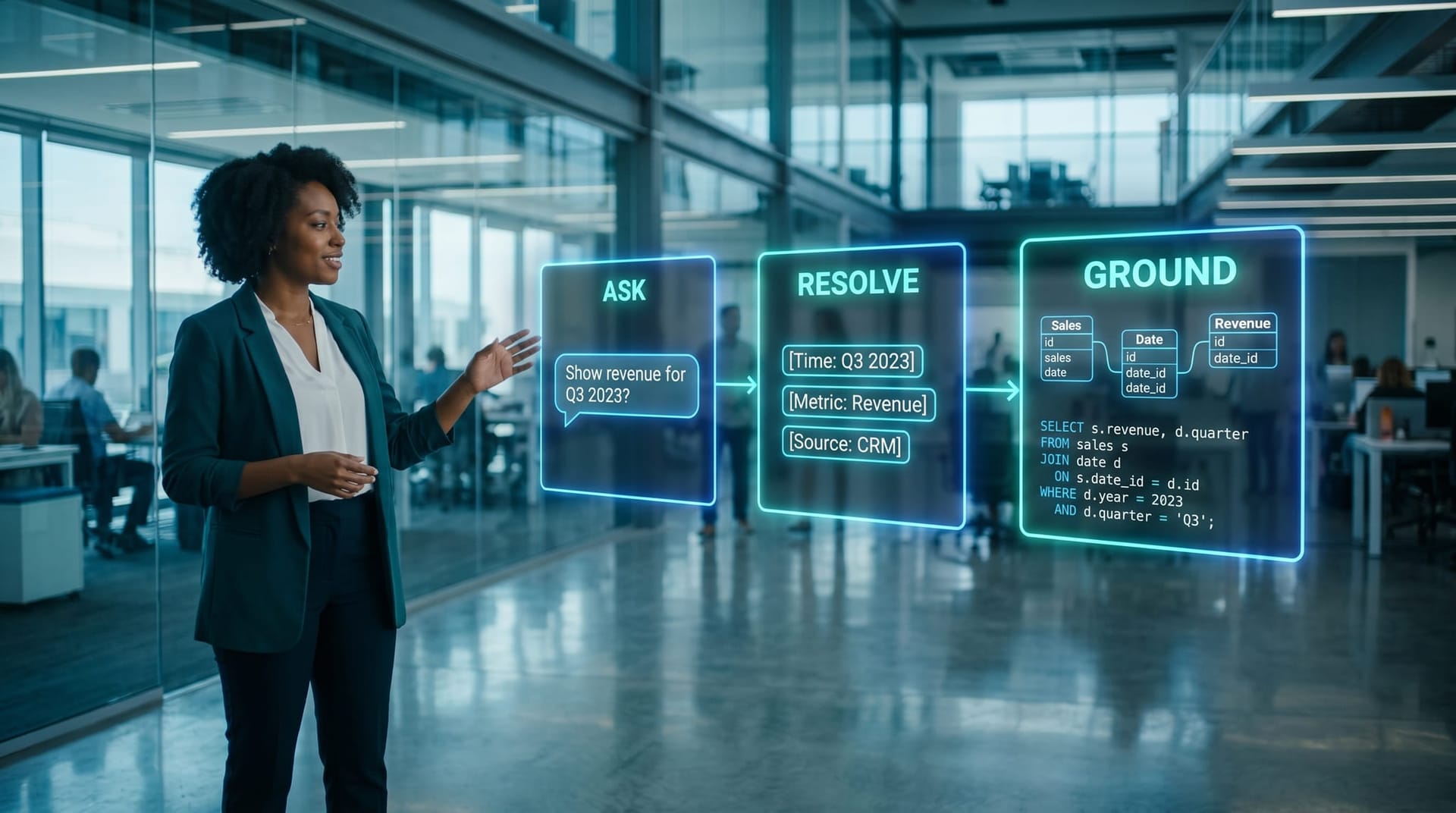
Mining logs is step one. The grounding happens when that mined history feeds a context layer that sits between the user's natural-language question and the SQL the agent writes. PuppyGraph's guide to agentic text-to-SQL describes a context layer pulling in metadata, entity relationships, query history, and business intent so the agent identifies the correct entities before it writes a single line of SQL. The sequencing matters: resolve what the question is about, retrieve how that thing has been queried before, and only then generate.
In practice the flow looks like this:
- A user asks an AI employee a question in plain language (“what was net revenue by region last quarter?”).
- The context layer resolves the business entities (net revenue, region, quarter) and retrieves the historical query patterns that have answered similar questions.
- The agent adapts a proven join pattern instead of inventing one, then validates the generated SQL against the schema before execution.
This is why grounding and architecture are inseparable. StackAI's walkthrough of building agents that query SQL in natural language treats the retrieval and schema-awareness pieces as core to the build, not bolt-ons. The query-log knowledge base is the highest-signal source you can plug into that retrieval step. If you are rethinking the foundation rather than patching one agent, our piece on how to rebuild your data stack for AI agents covers where this layer fits relative to the rest of your stack.
One honest caveat: a context layer built on history is only as good as the history. If your analysts have been running bad joins for years, you will encode bad joins. Mining logs surfaces the canonical patterns, but it also surfaces the mistakes, which is precisely why a human review step is non-negotiable before anything becomes “ground truth.” For regulated work where a wrong join can become a real exposure, our hallucination liability playbook walks through the governance side of getting grounded answers right.
When Should You Mine Logs Instead of Fine-Tuning or Buying Retrieval?
The temptation when an agent misbehaves is to escalate to the most powerful-sounding fix. Fine-tuning and a dedicated retrieval purchase both have a place, but they are rarely the right first move for the join problem specifically, because neither addresses the root cause as directly or as cheaply as the data you already hold.
| Approach | What it costs | What it actually fixes | First move? |
|---|---|---|---|
| Mine existing SQL query logs | Engineering time; you own the data | The exact join/table-pattern gap | Yes, almost always |
| Schema RAG / retrieval layer | License + integration | Narrows candidate tables | After logs, often alongside |
| Fine-tuning a model | Compute + ongoing maintenance | General phrasing/style, not your joins | Last, if at all |
The reason to start with logs is not just price. It is that the failure you are seeing, wrong tables and wrong joins, is a knowledge gap, not a reasoning gap. The model is not too dumb to join your tables correctly; it simply does not know which join is correct in your business. Fine-tuning can bake in some of that knowledge, but it is expensive to maintain and goes stale the moment your schema changes. A retrievable query-log knowledge base updates the moment a new validated query runs.
This connects to a broader architectural point Andrej Karpathy has made about the LLM as a knowledge base: the model is the reasoning engine, and your job is to feed it the right context, not to cram your entire business into its weights. Query logs are about as close to free, high-quality context as a mid-market shop will ever find. The same logic applies to durable agent behavior over time, which we covered in our look at agent memory that compounds rather than resetting every session. In our experience, teams that exhaust the log-mining option first end up needing far less of the expensive tooling, and they understand their own data better when they do buy it.

How Do You Start Mining Query Logs This Week?
You do not need a vendor or a budget cycle to begin. The first version of this is a read-only export and a spreadsheet, and we recommend treating it as a discovery exercise before it becomes an engineering project.
A practical do-this-Monday sequence:
- Locate the log. Snowflake has
QUERY_HISTORY, BigQuery hasINFORMATION_SCHEMA.JOBS, Postgres haspg_stat_statements, and most BI tools keep run history. Export 90 days, read-only. - Filter to the queries that matter. Drop one-off exploration and failed runs. Keep recurring, successful
SELECTqueries, especially ones that join. - Parse out the patterns. Extract the table combinations and the
ONconditions. Rank by frequency and recency. The top patterns are your canonical joins. - Have a human validate. Sit a data-literate person with the ranked list and confirm which patterns are correct and which are legacy cruft. This step is where bad history gets filtered out.
- Expose it to the agent. Feed the validated patterns into your context/retrieval layer so the agent retrieves a proven join before generating SQL.
Be honest about the limits. Logs only cover questions someone has asked before, so a genuinely novel question still needs schema reasoning. Query logs can also contain sensitive values in literals, so the export and any downstream index belong behind the same access controls as the database itself, and the agent's query path should be governed accordingly. Done carefully, though, the payoff is steep relative to the effort: you are converting an audit artifact you were already retaining into the grounding asset that stops the “wrong tables” complaint.
The Northeast Indiana Angle
Plenty of professional-services and manufacturing teams across Fort Wayne and DeKalb County are sitting on years of ERP and CRM query history that already encodes how their business actually joins its data, an asset most of them have never thought to point an AI employee at.
Frequently Asked Questions
Q1.What are SQL query logs and where do I find them?
SQL query logs are the recorded history of queries that ran against your database, including the tables, joins, and filters used. You can find them in your warehouse's query history (such as Snowflake's QUERY_HISTORY or BigQuery's INFORMATION_SCHEMA.JOBS), in Postgres extensions like pg_stat_statements, or in your BI tool's run history. Most teams already retain this data for audit purposes.
Q2.Why do AI agents hallucinate joins?
A raw database schema lists table and column names but does not tell the model which tables go together or which join keys are correct, so the model guesses. Analysis from typedef found that in large environments models can hallucinate table references over 60% of the time without schema constraints. Query logs fix this by showing the agent joins that have actually worked.
Q3.Is mining query logs better than fine-tuning?
For the specific problem of wrong tables and wrong joins, mining logs is usually the better first move because it targets a knowledge gap directly and uses data you already own. Fine-tuning is more expensive, harder to maintain, and goes stale when your schema changes. We recommend exhausting the log-mining option before committing to fine-tuning.
Q4.Will this work if my analysts have been writing bad queries?
Partly. Mining logs surfaces your most common patterns, but frequency does not guarantee correctness, so a human validation step is essential to filter out legacy or incorrect joins before they become “ground truth.” This is the single most important step in the process and should not be skipped.
Q5.What if someone asks a question no one has asked before?
Query logs only cover patterns that have been used before, so a genuinely novel question still requires the agent to reason from the schema. The right setup combines a query-log knowledge base for proven patterns with schema retrieval for new questions, as described in PuppyGraph's context-layer approach.
Q6.Are there security risks to using query logs for AI grounding?
Yes. Query logs can contain sensitive values embedded in query literals, so any export and downstream index should sit behind the same access controls as the source database, and the agent's query path should be governed accordingly. Treat the log-derived knowledge base as sensitive data, not as a harmless metadata file.
Q7.Do Northeast Indiana businesses already have usable SQL query logs?
Almost always, yes. Professional-services and manufacturing teams around Fort Wayne and DeKalb County typically run mature ERP and CRM systems that have been logging analyst queries for years, which means the grounding asset is already sitting in their warehouse. You can run a meaningful discovery exercise in a week: export 90 days of read-only logs, filter to recurring successful joins, rank by frequency and recency, and validate the top patterns with a data-literate person. Wiring the validated patterns into your agent's retrieval layer takes longer, but the discovery step alone often explains why your agent has been choosing the wrong tables.
Sources & Further Reading
- VentureBeat: venturebeat.com/data/sql-query-logs-hold-the-context-ai-agents-need-to-stop-hallucinating-joins — SQL query logs hold the context AI agents need to stop hallucinating joins
- TechBooky: techbooky.com/datahub-uses-sql-history-to-reduce-ai-errors — DataHub Turns SQL Query History into Context Layer to Cut AI Data Errors
- StackAI: stackai.com/insights/how-to-build-ai-agents-that-query-sql-databases-in-natural-language — How to Build AI Agents That Query SQL Databases in Natural Language
- Wren AI: medium.com/wrenai/reducing-hallucinations-in-text-to-sql — Reducing Hallucinations in Text-to-SQL
- PuppyGraph: puppygraph.com/blog/agentic-text-to-sql — Agentic Text-to-SQL: A Detailed Guide
- typedef: typedef.ai/resources/agentic-analytics-bigquery — Agentic Analytics on BigQuery
Ready to Ground Your AI Employees on the Data You Already Own?
You do not have to guess at which expensive fix to buy first. Cloud Radix helps mid-market teams in Fort Wayne, Auburn, and across Northeast Indiana audit the grounding assets they already have — including production SQL query logs — before spending on retrieval layers or fine-tuning. If you keep hearing that your agent queried the wrong tables, our AI consulting practice can map a query-log grounding plan to your stack, and our Secure AI Gateway keeps that data path governed end to end.
Schedule a Free Consultation